
ElementTrek1.1 - App Store
You'll be able to see results in few seconds.
Publisher Description
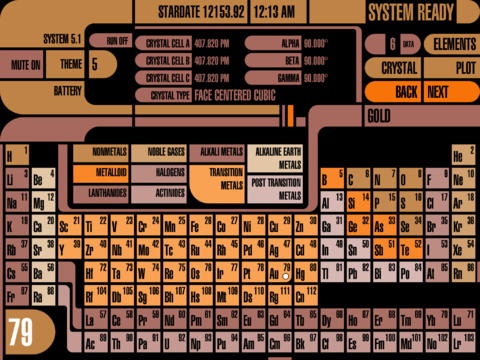
Element Trek is an interactive Periodic Table of the Elements, augmented with interactive (and animated) 3D models of their crystal structures (see screenshots below) and a vast array of technical data, including 24 plot charts. Using the Bohr model, the electron shells and subshells are presented graphically with the ability to expand any atomic shell into its component subshells to see their electrons. Additionally, there is a scrollable chart that shows the positions of the relative energy levels for all of these shells and subshells from lowest to highest, along with the magic numbers for filled shells.
(The Mac version is now available.)
The absorption spectra and emission spectra of each element can be displayed graphically, and simultaneously in list format that shows the value of each wavelength in nanometers and the wavelength intensity by percentage.
You can view a graphical representation of the melting point and boiling point of each element with simultaneous readouts in Fahrenheit, Celsius, and Kelvins. Additionally there is a chart that plots all of the melting points (and another for boiling points) for all of the elements.
All of the Ionization Energies for each element can be displayed graphically in either eV (electron volts) or switched to kJ/M (kiloJoules / Mole), and dragged across to reveal specific values.
The Periodic Tables shows the atomic number and atomic symbol of each element, and each element entry is color-coded according to the Category of the element. In the main Periodic Table, tapping any element will show the values of various properties of that element in the data readouts section. There are 6 sections of data that can be specified individually, or set to automatically advance and autorepeat.
There is a view which shows a chart of all of the Oxidation States for each each element, listed in ascending order by atomic number.
ELEMENT PROPERTIES:
Element Name
Atomic Number
Atomic Symbol
Category
Block
Phase
Group
Period
Atomic Weight
Protons
Neutrons
Electrons
First Ionization Energy
All Ionization Energies
Melting Point (K, F, C)
Boiling Point (K, F, C)
Atomic Radius (Calculated)
Atomic Radius (Experimental)
Covalent Radius
Van der Waals Radius
Electronegativity
Electron Affinity
Magnetism
Density
Oxidation States
Electron Structure ([Rn] 7s2 5f7)
Crystal Structure Type
Crystal Cell Dimensions and Angles
Critical Pressure
Critical Temperature
Heat of Fusion
Heat of Vaporization
Specific Heat
Thermal Conductivity
Thermal Expansion
Resistivity
Electrical Conductivity
Speed of Sound
Color
Valences
There are 44 different color themes to choose from that use futuristic graphics.
FEATURES:
Interactive Periodic Table of the Elements
3D Crystal Structures (Interactive / Animated)
Atom Structure (Bohr Model, Shells / Subshells)
Absorption Spectra
Emission Spectra
Ionization Energies Chart
Melting Points Chart
Boiling Points Chart
10 Element Category Essays
44 Color Themes
Digital Clock
12 Hour or 24 Hour Time
2 StarDate Types
Integrated Battery Status Readout and GUI
System Version Readout
Cool Sound FX
Mute Sound FX, for Silent Operation
Live Long and Prosper \\//
Requires iOS 5.1 or later. Compatible with iPad.
About ElementTrek
The company that develops ElementTrek is David Barnhardt. The latest version released by its developer is 1.1.
To install ElementTrek on your iOS device, just click the green Continue To App button above to start the installation process. The app is listed on our website since 2013-03-06 and was downloaded 0 times. We have already checked if the download link is safe, however for your own protection we recommend that you scan the downloaded app with your antivirus. Your antivirus may detect the ElementTrek as malware if the download link is broken.
How to install ElementTrek on your iOS device:
- Click on the Continue To App button on our website. This will redirect you to the App Store.
- Once the ElementTrek is shown in the iTunes listing of your iOS device, you can start its download and installation. Tap on the GET button to the right of the app to start downloading it.
- If you are not logged-in the iOS appstore app, you'll be prompted for your your Apple ID and/or password.
- After ElementTrek is downloaded, you'll see an INSTALL button to the right. Tap on it to start the actual installation of the iOS app.
- Once installation is finished you can tap on the OPEN button to start it. Its icon will also be added to your device home screen.
Program Details
System requirements
Download information
Pricing
Version History
version 1.1
posted on 2013-03-06
Disclaimer
Official App Store Link
We do not host ElementTrek on our servers. We did not scan it for viruses, adware, spyware or other type of malware. This app is hosted by Apple and passed their terms and conditions to be listed there. We recommend caution when installing it.
The App Store link for ElementTrek is provided to you by apps112.com without any warranties, representations or guarantees of any kind, so access it at your own risk.
If you have questions regarding this particular app contact the publisher directly. For questions about the functionalities of apps112.com contact us.
